
Run in Docker
Reverie ships a container image and a launcher script. The container holds Reverie and a ready-to-use Chromium. It runs headless or headed, with or without audio, and can use the host GPU.
The launcher keeps one container per project and runs each reverie command inside it.
What the image contains
Section titled “What the image contains”- Python 3.12 (Debian trixie base), uv, and Reverie with its locked dependencies.
- Chromium, installed with Playwright’s installer. Reverie does not depend on Playwright. It starts Chromium itself and talks to it over CDP. The installer is only a way to get the same Chromium build on both
linux/amd64andlinux/arm64. reverie-chromium, a wrapper that adds the container flags (GPU, no-sandbox, shared-memory fix). The image setsREVERIE_BROWSERto it.- The Mesa GPU stack (EGL, Vulkan, VA-API,
vainfo). Intel VA-API drivers are included on amd64 only. - PulseAudio client tools and
mpv, for narration, including thefishvoice. The offlineespeakvoices are not included. - A non-root
reverieuser (UID and GID 1000 by default; build argsREVERIE_UIDandREVERIE_GID). The launcher overrides it with your own UID and GID, so files written to mounted folders belong to you.
The image is large, about 1.35 GB, because it holds Chromium, Mesa and the Vulkan drivers.
Build the image
Section titled “Build the image”Run these from a clone of the Reverie repository. You need Docker with BuildKit (docker buildx).
scripts/reverie-docker.sh build # host platform, loaded as reverie:localscripts/reverie-docker.sh build --multi --push # linux/amd64 and linux/arm64scripts/reverie-docker.sh build --multi --output type=oci,dest=reverie.tarExtra arguments after build go to docker buildx build. For --multi --push, set REVERIE_IMAGE to a registry tag you can push to. Set REVERIE_PLATFORMS to change the platform list.
Run from your project
Section titled “Run from your project”Change to the project you test, then call the launcher by its path. Any argument that is not a launcher command goes to reverie.
cd /path/to/my-project/path/to/reverie/scripts/reverie-docker.sh --session demo start --url http://localhost:8765/login/path/to/reverie/scripts/reverie-docker.sh --session demo spec path/to/test.md/path/to/reverie/scripts/reverie-docker.sh --session demo pilot/path/to/reverie/scripts/reverie-docker.sh downreverie start leaves a daemon running. So the launcher starts one long-lived container named reverie-<project dir> on first use and runs each command in it with docker exec. down removes the container. When the container has no display, the launcher adds --headless to reverie start unless you passed it.
Launcher commands
Section titled “Launcher commands”| Command | What it does |
|---|---|
build [--multi] |
Builds the image. |
up |
Starts the container for this project (other commands do this for you). |
down |
Removes the container. |
status |
Prints whether the container runs, and whether it is headed or headless. Exits 1 when it is not running. |
logs |
Shows the container’s logs. |
doctor |
Prints the user, architecture, display, audio, GPU nodes, downloads folder, browser and vainfo output. |
gpu-check |
Opens chrome://gpu in the container and reports acceleration. See GPU. |
shell |
Opens bash in the container. |
help |
Prints the launcher’s usage. |
| anything else | Runs as reverie <args>. |
What the launcher mounts
Section titled “What the launcher mounts”| Item | In the container | Notes |
|---|---|---|
| Project directory | Same path as on the host | Reverie finds .reverie/ and your specs at the same paths. Runs and artifacts land in <project>/.reverie/runs. |
| Downloads | /downloads |
Host folder <project>/.reverie/downloads. REVERIE_DOWNLOAD_DIR=/downloads is set, so browser downloads land there. |
~/.config/reverie/.env |
/etc/reverie/.env, read-only |
Mounted only if the file exists. REVERIE_ENV_FILE points Reverie at it. See Configuration. |
/dev/dri |
/dev/dri |
GPU nodes. The launcher adds their groups with --group-add. |
| Wayland or X11 socket | /runtime/<wayland socket> or /tmp/.X11-unix |
Chosen automatically. Needed only for headed runs. |
| PulseAudio or PipeWire socket | /runtime/pulse/native |
PipeWire exposes the same socket. |
The container also gets a 1 GB /dev/shm (REVERIE_SHM).
Host networking is the default. The container reaches localhost services on the host, such as your app under test or, for local Laya, a laya.cpp server at 127.0.0.1:8080. The default Jev engine needs only OPENROUTER_API_KEY, which can live in the mounted .env file above. Host networking also makes the dashboard reachable on the host. With REVERIE_DOCKER_NETWORK=bridge, use host.docker.internal or published ports instead.
Headless or headed
Section titled “Headless or headed”With REVERIE_DISPLAY=auto (the default), the launcher picks Wayland if its socket exists, then X11 if DISPLAY is set, and otherwise runs headless. Set REVERIE_DISPLAY to wayland, x11 or headless to force a mode.
For X11, allow the container user once on the host, or let the launcher mount your XAUTHORITY file (it does so when the variable is set):
xhost +SI:localuser:$(id -un)REVERIE_GPU |
Behaviour |
|---|---|
auto (default) |
Uses dri when a render node exists in /dev/dri, otherwise software. |
dri |
Mesa through /dev/dri, for AMD and Intel GPUs (VA-API video decode). |
nvidia |
NVIDIA Container Toolkit instead of /dev/dri. |
off |
Software rendering (SwiftShader). |
For dri and nvidia, the wrapper tells Chromium to use ANGLE on EGL, ignore the GPU blocklist, and enable GPU rasterization and VA-API. Without ANGLE on EGL, headless Chromium falls back to software rendering even when /dev/dri is present. Set REVERIE_GPU_BACKEND=vulkan to use ANGLE on Vulkan instead.
Check acceleration
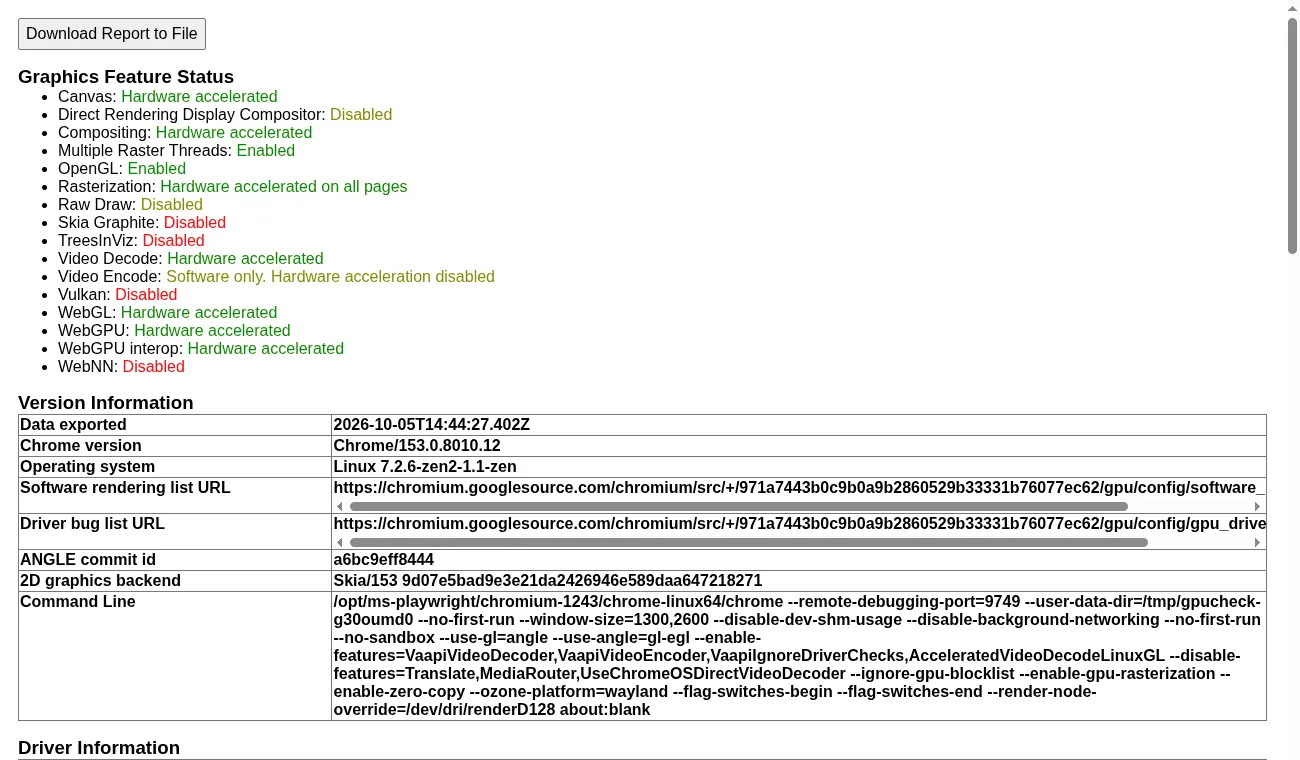
Section titled “Check acceleration”scripts/reverie-docker.sh gpu-checkThis opens chrome://gpu, then saves gpu.txt and a gpu.png screenshot to /downloads (change it with REVERIE_GPU_OUT). It exits 1 if Compositing, Rasterization, WebGL or Canvas is software. Add --headed to use the display instead of headless mode. For VA-API, run scripts/reverie-docker.sh shell and then vainfo. If autodetection fails, set LIBVA_DRIVER_NAME (for example radeonsi or iHD).
NVIDIA
Section titled “NVIDIA”NVIDIA support is documented but untested. Install the NVIDIA Container Toolkit on the host and register it with Docker:
sudo nvidia-ctk runtime configure --runtime=dockerREVERIE_GPU=nvidia scripts/reverie-docker.sh upThe launcher then passes --gpus all and NVIDIA_DRIVER_CAPABILITIES=all. Chromium does not decode video through NVDEC unless nvidia-vaapi-driver is present. WebGL and compositing work without it. Run gpu-check to see what you get.
Verification results
Section titled “Verification results”The maintainers checked one Linux x86-64 host with an AMD GPU, Wayland and PipeWire. With the default flags, headless and headed Chromium reported Canvas, Compositing, Rasterization, Video Decode, WebGL and WebGPU as hardware accelerated, and vainfo listed H.264 and HEVC decode. Without ANGLE on EGL, Chromium used software rendering. A headless session ran start, observe, act, check, screenshot and stop, and a headed Wayland session opened a window. NVIDIA, X11 and linux/arm64 were not run.
Narration plays through paplay, or through mpv for the fish voice. The launcher mounts the host PulseAudio (or PipeWire) socket when it exists.
REVERIE_AUDIO |
Behaviour |
|---|---|
auto (default) |
On when the socket exists. |
on |
On. The launcher fails if the socket is missing. |
off |
No socket is mounted and the container sets SPEECH_PROVIDER=off. |
For the fish voice, put SPEECH_PROVIDER=fish, FISH_AUDIO_API_TOKEN and FISH_AUDIO_VOICE_ID in your env file. A text-to-speech server on the host also works over host networking, for example --voice kitten.
Docker Compose
Section titled “Docker Compose”The launcher is the easiest route. If you prefer Compose, docker/compose.yaml is a headless base with the GPU through /dev/dri. Add overrides for display, audio and NVIDIA:
| File | Adds |
|---|---|
docker/compose.wayland.yaml |
Headed Chromium on the host Wayland compositor. |
docker/compose.x11.yaml |
Headed Chromium on the host X11 server. |
docker/compose.audio.yaml |
The PulseAudio or PipeWire socket. |
docker/compose.nvidia.yaml |
The NVIDIA toolkit instead of /dev/dri. |
Set your IDs so the container user and GPU groups match the host, then start the stack. Without RENDER_GID and VIDEO_GID, the Compose file falls back to the image’s video group (GID 44, as on Debian and Ubuntu hosts); the render node usually needs RENDER_GID.
export REVERIE_UID=$(id -u) REVERIE_GID=$(id -g)export RENDER_GID=$(stat -c %g /dev/dri/renderD128) VIDEO_GID=$(getent group video | cut -d: -f3)docker compose -f docker/compose.yaml -f docker/compose.wayland.yaml -f docker/compose.audio.yaml up -ddocker compose -f docker/compose.yaml exec reverie reverie-entrypoint reverie --helpThe Compose files read the same REVERIE_IMAGE, REVERIE_PROJECT, REVERIE_ENV_FILE, REVERIE_DOCKER_DOWNLOADS, REVERIE_GPU and REVERIE_AUDIO variables. They do not add --headless for you, so pass it to reverie start when you run without a display.
Settings
Section titled “Settings”Set these in your shell before calling the launcher.
| Variable | Values | Default |
|---|---|---|
REVERIE_IMAGE |
Image tag | reverie:local |
REVERIE_PROJECT |
Project directory to mount | Current directory |
REVERIE_DOCKER_NAME |
Container name | reverie-<project dir> |
REVERIE_DISPLAY |
auto, wayland, x11, headless |
auto |
REVERIE_AUDIO |
auto, on, off |
auto |
REVERIE_GPU |
auto, dri, nvidia, off |
auto |
REVERIE_GPU_BACKEND |
egl, vulkan |
egl |
REVERIE_GPU_OUT |
Folder for gpu-check output, inside the container |
/downloads |
REVERIE_DOCKER_NETWORK |
host, bridge, or a network name |
host |
REVERIE_ENV_FILE |
Env file to mount read-only | ~/.config/reverie/.env |
REVERIE_DOCKER_DOWNLOADS |
Host folder mounted at /downloads |
<project>/.reverie/downloads |
REVERIE_RUNS_DIR |
Host folder for runs and artifacts | <project>/.reverie/runs |
REVERIE_SHM |
Size of /dev/shm |
1g |
REVERIE_PLATFORMS |
Platforms for build --multi |
linux/amd64,linux/arm64 |
REVERIE_CHROMIUM_FLAGS |
Extra Chromium flags, space separated | none |
REVERIE_CHROMIUM_SANDBOX |
1 keeps Chromium’s own sandbox |
0 |
Changes to display, audio, GPU, network and mounts apply when the container is created. Run down first so the next command recreates it.
Troubleshooting
Section titled “Troubleshooting”- Rendering is software only. Run
gpu-check. Make sure/dev/driexists on the host andREVERIE_GPUis notoff. Rundoctorto see the nodes the container sees. - VA-API does not start. Run
vainfoinshell. SetLIBVA_DRIVER_NAMEif autodetection fails. The image needs a VA-API driver for your GPU. Mesa covers AMD, Nouveau and most Arm GPUs. - The headed window fails to open on X11. Run the
xhostcommand above, or setXAUTHORITYso the launcher mounts it. - “REVERIE_AUDIO=on but … is missing”. The host has no PulseAudio or PipeWire socket. Start the audio server, or set
REVERIE_AUDIO=off. - No audio. Check the
audio:line indoctor. Without a socket, narration is off. - Chromium crashes in a locked-down container. The container is the sandbox, so
--no-sandboxis on. To keep Chromium’s sandbox, setREVERIE_CHROMIUM_SANDBOX=1and add--cap-add SYS_ADMINor a seccomp profile that allows user namespaces. - Cannot reach your app. With
bridgenetworking,localhostis the container. Usehost.docker.internalor published ports, or switch back tohost. - Video encode is slow. Chromium on Linux encodes video in software, even when the driver supports VA-API encode.
For other problems, see Troubleshooting.